
Data Pipelines & ETL
Flow-Like Flows can coordinate data movement across APIs, databases, files, and local storage. A reliable pipeline makes each boundary explicit: where data came from, how it changed, where it was written, and what happens when a step fails.
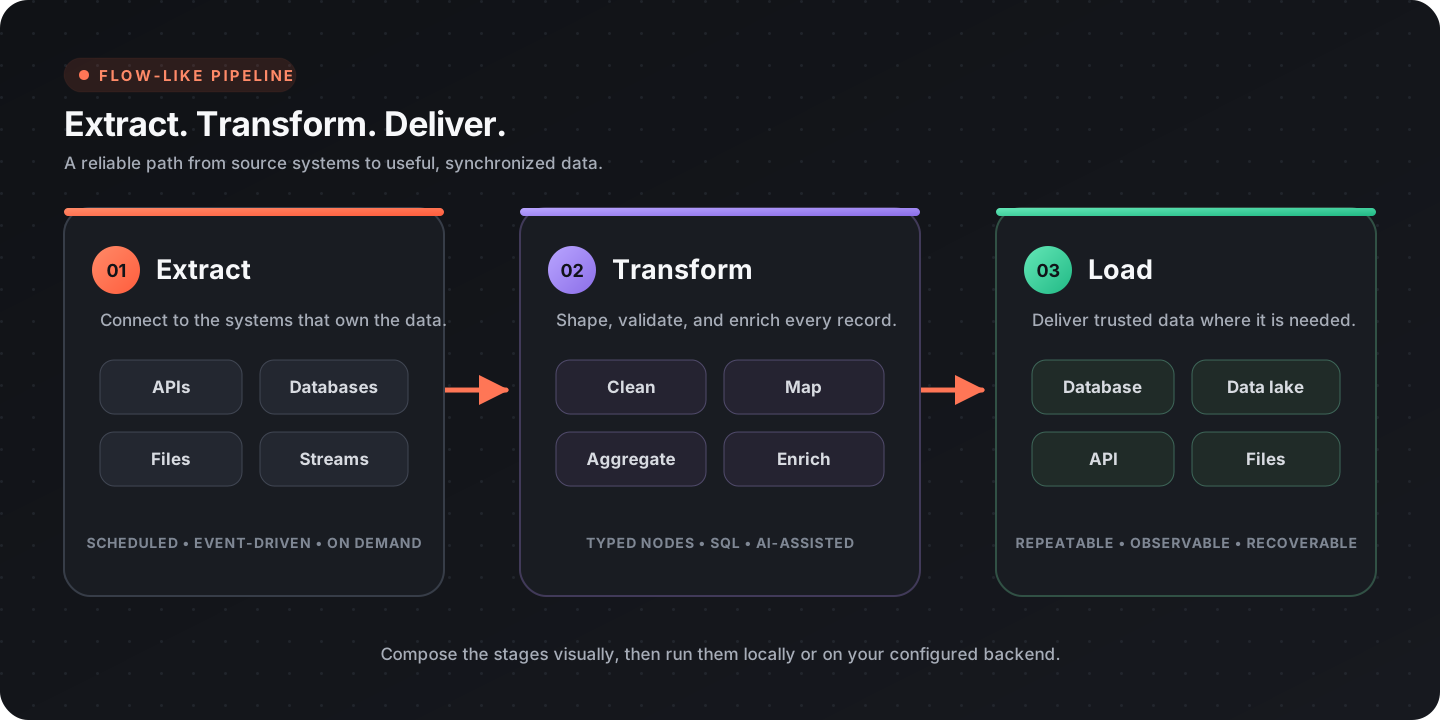
Pipeline architecture
Section titled “Pipeline architecture”| Stage | Responsibility |
|---|---|
| Trigger | Decide when and why the run starts |
| Extract | Read source records without losing provenance |
| Normalize | Standardize names, types, dates, and identifiers |
| Transform | Filter, join, aggregate, enrich, and validate |
| Load | Write to the destination with idempotent behavior |
| Observe | Record counts, duration, failures, and checkpoints |
Keep these responsibilities visible even when a small pipeline combines several of them in one Flow.
Extract data
Section titled “Extract data”Databases and data lakes
Section titled “Databases and data lakes”DataFusion nodes can mount files and register database or lake sources in a query session.
| Source | Relevant nodes |
|---|---|
| Session | Create DataFusion Session |
| PostgreSQL, MySQL, SQLite, and other databases | DataFusion databases |
| CSV, JSON, Parquet | Mount CSV, Mount JSON, Mount Parquet |
| Delta and Iceberg | DataFusion lakes |
| Local Flow-Like database | Open Database |
Use source-side filters when possible. For an incremental database read, select records using a stable cursor such as an updated timestamp plus a unique ID, then save the new checkpoint only after the destination write succeeds.
Build a request with the HTTP request nodes and execute it with API Call. Handle pagination according to the provider’s contract:
- cursor pagination: save and submit the returned cursor;
- page pagination: increment the page until the response is empty or marks completion;
- link pagination: follow the provider’s next link;
- time windows: use non-overlapping boundaries and a stable tie-breaker.
Read credentials from secrets, validate the status before parsing, and respect provider rate limits.
Files and documents
Section titled “Files and documents”Use format-specific readers rather than treating every file as raw text:
- Buffered CSV Reader for large CSV files;
- DataFusion mounts for CSV, JSON, or Parquet queries;
- Document processing for PDFs, spreadsheets, images, DOCX, and PPTX;
- provider download nodes or HTTP Download for remote files.
Validate the actual content type where practical. A file extension alone is not a sufficient trust boundary.
Transform data
Section titled “Transform data”SQL transformations
Section titled “SQL transformations”Register the required sources in one DataFusion session, then use SQL Query for filtering, joins, aggregation, and window functions.
SELECT customer_id, DATE_TRUNC('day', created_at) AS order_day, SUM(amount) AS revenueFROM ordersWHERE created_at >= TIMESTAMP '2026-01-01 00:00:00'GROUP BY customer_id, DATE_TRUNC('day', created_at);Construct dynamic query text only from validated, allow-listed values; never concatenate arbitrary user input. Keep business definitions such as revenue or active customer in one reusable query or workflow so dashboards and reports do not drift.
Workflow transformations
Section titled “Workflow transformations”Use workflow nodes when the transformation is naturally record-oriented or depends on external services:
| Need | Pattern |
|---|---|
| Normalize one record | Map source fields into a stable destination schema |
| Apply business rules | Branch on validated, named conditions |
| Call an enrichment API | Limit concurrency and cache reusable results |
| Process a collection | For Each or Parallel For Each |
| Combine parallel results | Gather |
Prefer set-based SQL for large joins and aggregations. Use per-record workflow loops only when each record requires its own logic or side effect.
Validate data
Section titled “Validate data”Validate before writing:
- required fields are present;
- identifiers are unique where expected;
- numeric and date values parse in the intended locale and timezone;
- enum values are recognized;
- foreign keys or reference values exist;
- row counts and totals are plausible;
- rejected records retain the source reference and rejection reason.
Separate invalid data from execution errors. An invalid record may be routed to review while the run continues; a broken destination connection may require the run to stop.
Load data
Section titled “Load data”The local database catalog supports single and batch writes:
| Behavior | Node |
|---|---|
| Insert one record | Insert |
| Insert a batch | Batch Insert |
| Upsert one record | Upsert |
| Upsert a batch | Batch Upsert |
| Insert CSV data | Batch Insert (CSV) |
Choose a deterministic key and use upsert when a run may be retried. For external destinations, use their idempotency or merge mechanism when available.
Trigger and schedule runs
Section titled “Trigger and schedule runs”Choose a trigger that matches freshness needs:
| Trigger | Best for |
|---|---|
| Schedule | Periodic imports, reports, and maintenance |
| App or generic event | User-initiated or system-initiated jobs |
| Incoming API event | Near-real-time updates from external systems |
| Upstream completion | Multi-stage pipelines with explicit dependencies |
See App events for event configuration. Avoid polling much more frequently than the source can change or the destination can safely accept writes.
Reliability patterns
Section titled “Reliability patterns”Checkpoints
Section titled “Checkpoints”Store the last successful cursor, time window, or source offset. Update it only after the corresponding destination batch commits.
Idempotency
Section titled “Idempotency”Make retries safe by using stable source identifiers, destination upserts, provider idempotency keys, or a run ledger.
Batching and concurrency
Section titled “Batching and concurrency”Batch to bound memory and transaction size. Limit parallel work according to database capacity, file size, and API rate limits.
Error handling
Section titled “Error handling”Record the stage, safe source identifier, error type, attempt count, and run ID. Redact credentials and sensitive payload fields. Retry transient failures with backoff; route permanent data errors to review.
Observability
Section titled “Observability”At minimum, record:
- run start, end, and duration;
- extracted, accepted, rejected, and written counts;
- current checkpoint;
- retry and failure counts;
- the Flow and configuration version used for the run.
Example: customer synchronization
Section titled “Example: customer synchronization”| Stage | Operation |
|---|---|
| Trigger | Run on a schedule or explicit app event |
| Extract | Request customer pages from the source API |
| Normalize | Standardize email, country, and timestamp fields |
| Enrich | Resolve optional reference data with bounded concurrency |
| Validate | Require a source ID and valid business fields |
| Load | Batch upsert by source ID |
| Finish | Save the cursor and emit a run summary |
If a batch fails after extraction, repeat the same batch with the same source IDs. The upsert key and delayed checkpoint update prevent duplicates or skipped pages.
Design checklist
Section titled “Design checklist”- Source, destination, and owner are documented
- Credentials come from secrets or provider connections
- Pagination or incremental cursors are explicit
- Transformations produce a stable schema
- Invalid records have a review or quarantine path
- Destination writes are idempotent
- Batch size and concurrency are bounded
- Checkpoints advance only after successful writes
- Run metrics and safe error context are retained