
Runtime Variables
Runtime variables separate a value from the Flow that uses it. They are useful for API keys, passwords, local paths, environment-specific endpoints, and any other value that should be supplied by the person or device running the Flow.
The Flow definition keeps the variable’s name, type, and settings. Its saved runtime value lives in Flow-Like’s local application storage instead of being synced with the app.
This page describes values configured in the Desktop app and supplied to interactive runs. A standalone device deployment has its own service configuration and secrets on the target. Supply those values during deployment; a secret saved on your editing computer does not automatically become available to an unattended device service.
Configure a value
Section titled “Configure a value”- Open a Flow in Studio and open its variables panel.
- Select the variable.
- Enable Runtime Configured.
- Enable Secret as well when the value should be masked and excluded from remote execution.
- Open the app and select Setup.
- Expand the Flow, enter the value, and select Save.
Variables marked Secret also appear on the Setup screen, even when Runtime Configured is off.
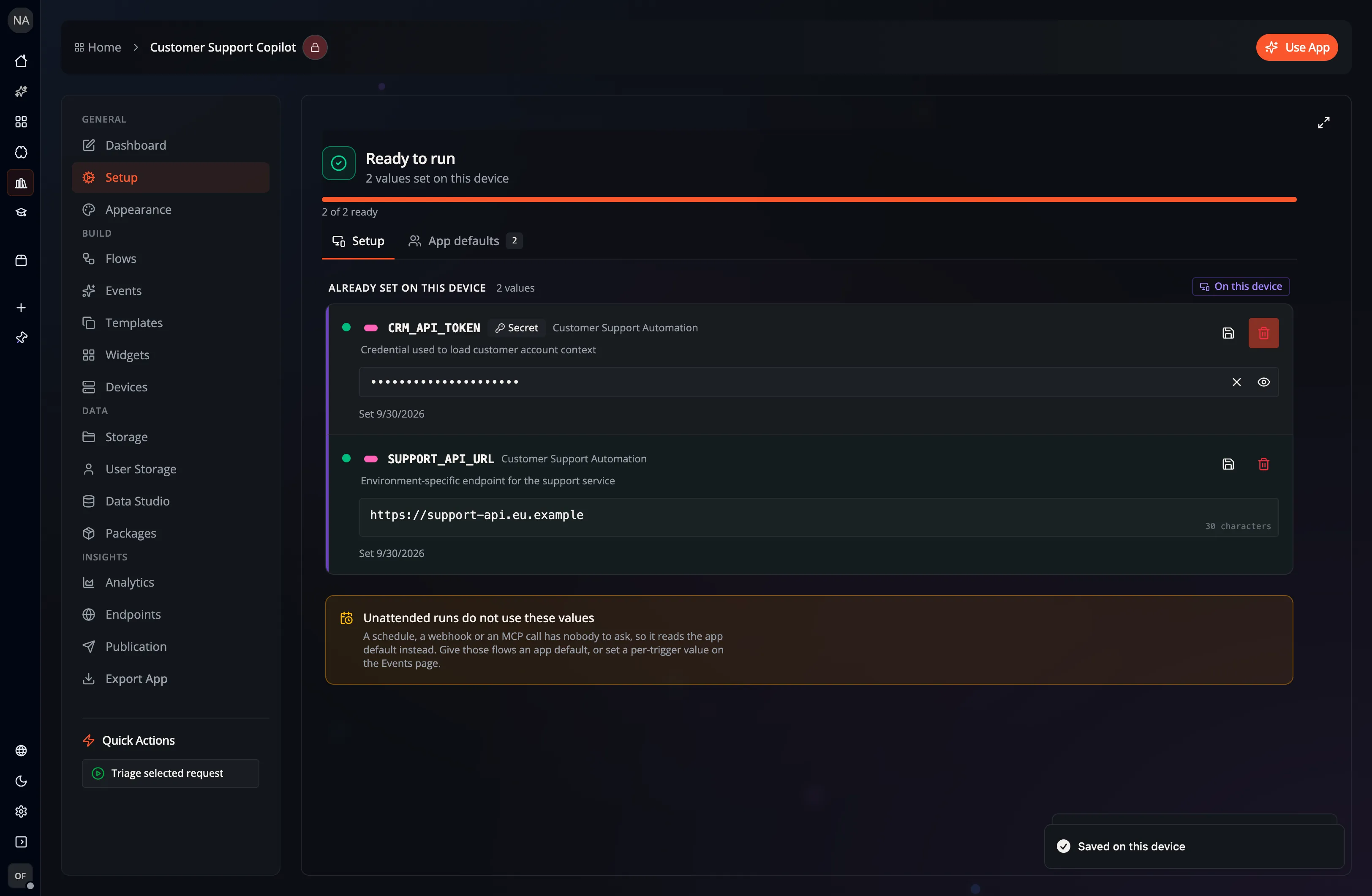
Runtime configured and secret are different
Section titled “Runtime configured and secret are different”The two settings solve related but distinct problems:
| Setting | Local value | Display | Remote execution |
|---|---|---|---|
| Runtime Configured | Saved per app and device | Uses the editor for its data type | Included with that run when it executes remotely |
| Secret | Saved per app and device | Masked, with an explicit reveal control | Excluded from the remote execution payload |
| Both | Saved per app and device | Masked | Excluded from the remote execution payload |
Use Runtime Configured for values that vary by user, machine, or environment. Add Secret for credentials and other sensitive values.
Where values go
Section titled “Where values go”Flow-Like Desktop stores configured values in its local IndexedDB database, keyed by app and variable. Values use the same JSON-encoded byte representation as Flow variables.
This separation prevents the configured value from being written back into the Flow definition or synced as part of the app. It is not a claim that the value is independently encrypted at rest: protect the operating-system account and local application data like any other credential store.
During execution:
- A local run can receive runtime-configured values and secrets.
- A remote run can receive non-secret runtime-configured values for that run.
- Secret values are filtered out before a remote execution request is sent.
- A saved runtime value takes precedence over the value carried by the Flow definition.
Values supplied for a run are excluded from its saved replay inputs. Automatic variable-read logs and debug variable snapshots omit secret and runtime-configured values. A replay resolves runtime configuration again instead of restoring it from the recorded run.
Remote runs with supplied runtime values require direct HTTP or Lambda streaming dispatch. Queue and staged-job backends reject these requests before dispatch because they would retain the values server-side. Local configuration storage continues to work as described above.
The Hybrid execution mode does not split one graph between local and remote machines. On Desktop it normally runs locally; on a web or remote-only path it runs remotely. See Offline vs. Online for the complete execution-mode matrix.
Events
Section titled “Events”Events use the runtime-variable requirements of their referenced Flow. An event can execute locally or remotely depending on the client, permissions, and the Flow’s execution mode:
- Interactive local execution can prompt for missing values.
- Remote execution includes only non-secret runtime values.
- Unattended remote events cannot use a secret that exists only on someone’s device.
Good practices
Section titled “Good practices”- Keep credentials out of regular variable defaults.
- Use clear names such as
OPENAI_API_KEYorDATABASE_URL. - Add a description that tells the runner what to provide, without including the value itself.
- Give each environment its own local configuration.
- Delete a saved value from Setup when a device should no longer use it.
- Do not copy or share Flow-Like’s local application-data directory as a way to distribute credentials.