
Custom WASM Nodes
Flow-Like can load custom workflow nodes from WebAssembly binaries. A package may expose one node or a related set of nodes, and the runtime uses the same node definitions and execution result types as the native catalog.
Language support depends on whether a toolchain can produce one of Flow-Like’s supported binary interfaces. Start from a repository template instead of assuming that every generic .wasm file is compatible.
Why use a WASM node?
Section titled “Why use a WASM node?”| Benefit | What it means in Flow-Like |
|---|---|
| Language choice | Use one of the maintained Component Model or core-module templates |
| Isolation | Wasmtime applies fuel, timeout, memory, and capability controls |
| Portable package | The same compatible binary format can be loaded by Flow-Like desktop and hosted executors |
| Multiple nodes | One package can return several node definitions through get-nodes / get_nodes |
| Registry distribution | Published versions can be reviewed, installed, cached, updated, or disabled |
Package anatomy
Section titled “Package anatomy”A typical template contains:
| Item | Purpose |
|---|---|
flow-like.toml | Package identity, version, metadata, and package-level resource declarations |
node.wasm | Component Model component or core WebAssembly module |
| Language SDK or bindings | Implements the Flow-Like node contract |
| Tests and examples | Validate definitions and execution behavior before publishing |
The publish screen collects manifest fields and uploads the compiled binary. During registry processing, Flow-Like instantiates the binary and extracts its exported node definitions, so the catalog reflects the executable artifact.
Node contract
Section titled “Node contract”Every compatible package provides:
- one node definition or a list of definitions;
- a
runimplementation; - a numeric ABI version where the template exposes it;
- JSON-compatible inputs and outputs;
- declared node permissions for any protected host capability.
Definitions can include typed pins, defaults, schemas, documentation, icons, quality scores, and permission labels.
Pin data types
Section titled “Pin data types”| Data type | Typical JSON value |
|---|---|
Execution | null control signal |
String | "hello" |
Integer | 42 |
Float | 3.14 |
Boolean | true |
Date | ISO 8601 string |
PathBuf | Flow-Like storage path |
Struct | JSON object |
Byte | Byte payload represented by the SDK |
Generic | Any supported JSON-compatible value |
Pins can be normal values, arrays, hash maps, or hash sets. A template’s SDK is responsible for mapping its language types to this contract.
Runtime models
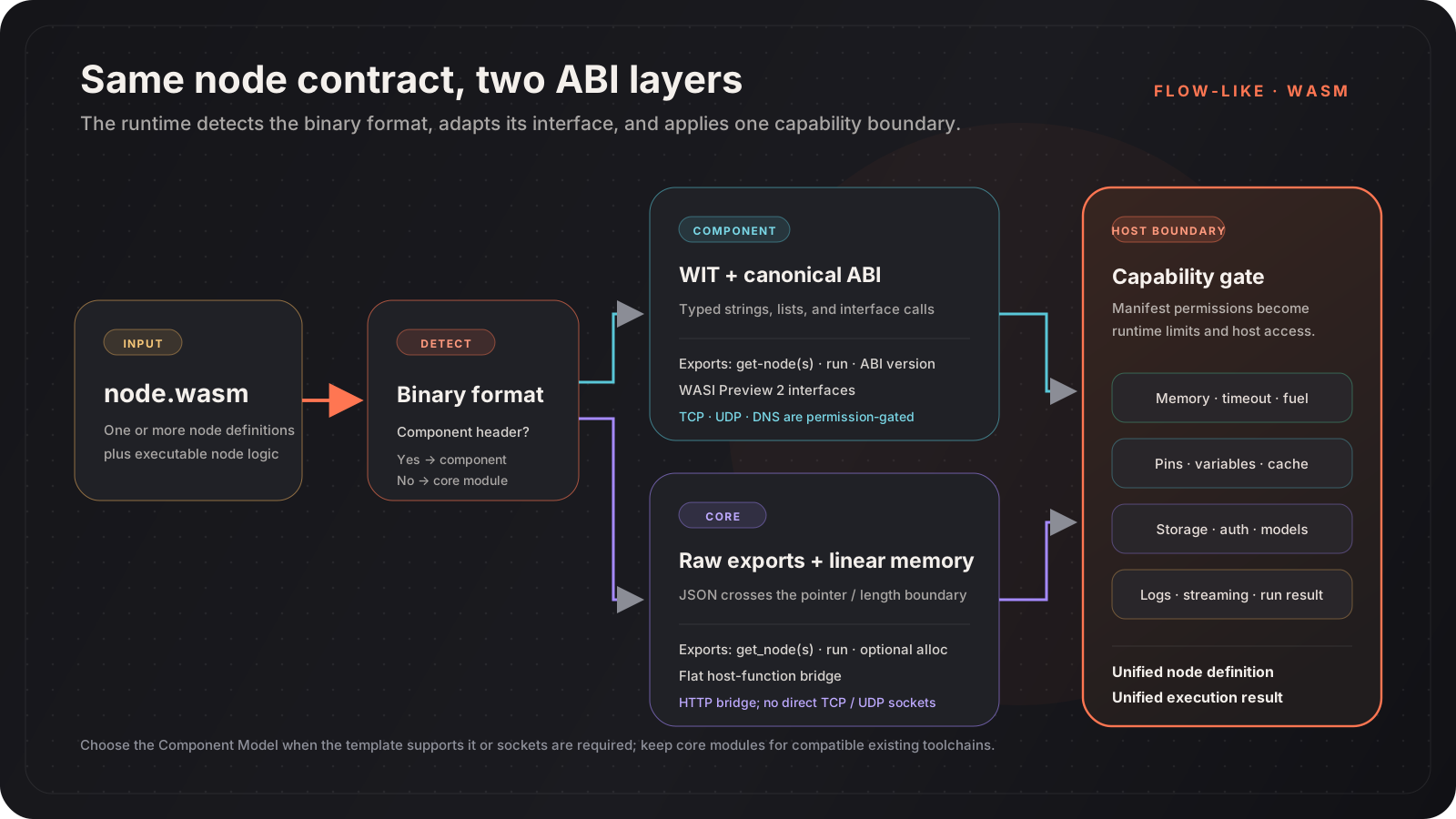
Section titled “Runtime models”Flow-Like auto-detects two binary formats:
| Model | Interface | Best fit |
|---|---|---|
| Component Model | WIT interfaces and the canonical ABI | New packages, typed bindings, or permission-gated WASI sockets |
| Core module | Raw exports plus JSON in linear memory | Existing core-module toolchains and compatibility templates |
Both models end at the same Flow-Like node abstraction, but their SDK and networking support differ. See Component Model vs Core Modules.
Maintained templates
Section titled “Maintained templates”Component Model
Section titled “Component Model”| Language | Template |
|---|---|
| Rust | templates/wasm-node-rust |
| Go | templates/wasm-node-go |
| C++ | templates/wasm-node-cpp |
| Zig | templates/wasm-node-zig |
| C# | templates/wasm-node-csharp |
| Swift | templates/wasm-node-swift |
| Python | templates/wasm-node-python |
| TypeScript | templates/wasm-node-typescript |
Core modules
Section titled “Core modules”| Language | Template |
|---|---|
| AssemblyScript | templates/wasm-node-assemblyscript |
| Kotlin | templates/wasm-node-kotlin |
| Nim | templates/wasm-node-nim |
| Lua | templates/wasm-node-lua |
| Java | templates/wasm-node-java |
| Grain | templates/wasm-node-grain |
| MoonBit | templates/wasm-node-moonbit |
The repository’s templates/wasm-capability-matrix.md is the source of truth for current template format and SDK parity.
Permissions and resource limits
Section titled “Permissions and resource limits”The runtime converts declared permissions into capabilities. Protected operations return no data or fail when the required capability is absent.
| Capability area | Examples |
|---|---|
| Network | HTTP, WebSocket, TCP, UDP, DNS |
| Flow context | Variables, cache, streaming, A2UI |
| Storage | Scoped reads and writes |
| Authentication | Configured OAuth access |
| Models | Hosted embedding and language-model calls |
Packages also select memory and timeout tiers. Current manifest tiers range from 16 MB to 4 GB and from 5 seconds to 30 minutes; deployment policy can still impose stricter limits.
See Sandboxing & Permissions and Package Manifest before adding external access.
Development workflow
Section titled “Development workflow”- Copy the closest language template.
- Change the package identity and node definition.
- Implement
runwith the template SDK. - Declare only the capabilities the node needs.
- Run the template’s tests and build task.
- Publish the resulting
.wasmthrough Packages › Mine → Publish… on the package card (Flow-Like Desktop). - Install the approved or private package and test it in a real board.
Installed packages are cached locally. Hosted execution resolves package versions and verified compiled artifacts through the registry.