
Route-state API and resolution
This guide specifies route storage and resolution for integrations. For the authoring procedure, use Configure App routes. The shared interface concepts explain Page ownership and publication.
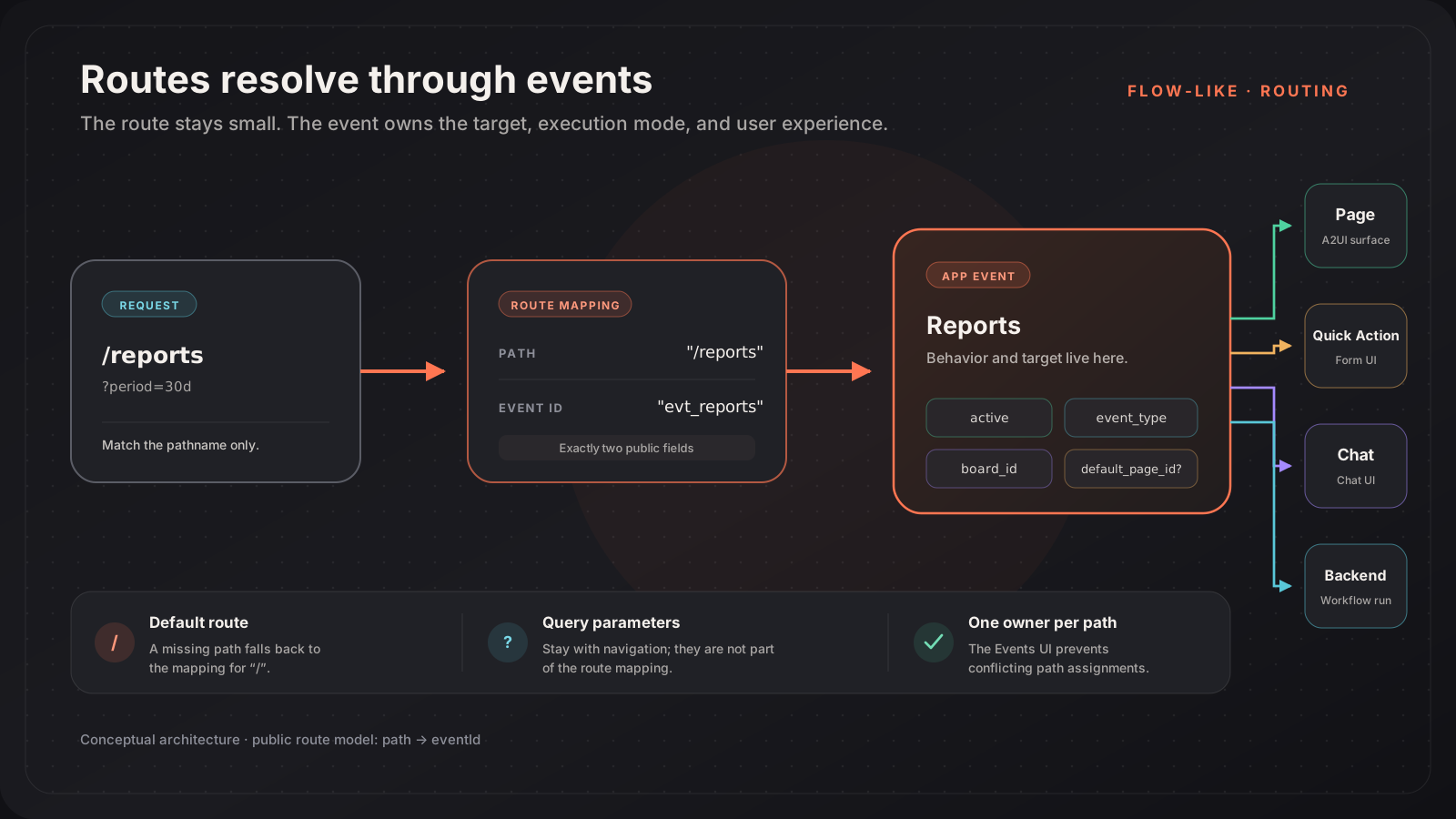
The route-state API stores a mapping from a URL path to an App Event:
interface IRouteMapping { path: string; eventId: string;}The Event decides what happens next. It can render a Page, open a built-in UI such as Chat or Quick Action, or execute workflow behavior.
Why Routes Point to Events
Section titled “Why Routes Point to Events”Putting the Event between navigation and presentation gives one routing model to every app experience:
- a Page-target Event uses
default_page_idto select a Page; - a Chat Event opens the chat interface;
- a Quick Action or Generic Form Event opens its form interface;
- a backend-only Event can run without a UI route.
The route does not store a Page ID, board ID, version, label, icon, priority, timestamps, or target type. Those fields belonged to an older route model and should not be used by new integrations.
Configure Routes in the UI
Section titled “Configure Routes in the UI”Routes are managed with their Events, not in a separate route editor.
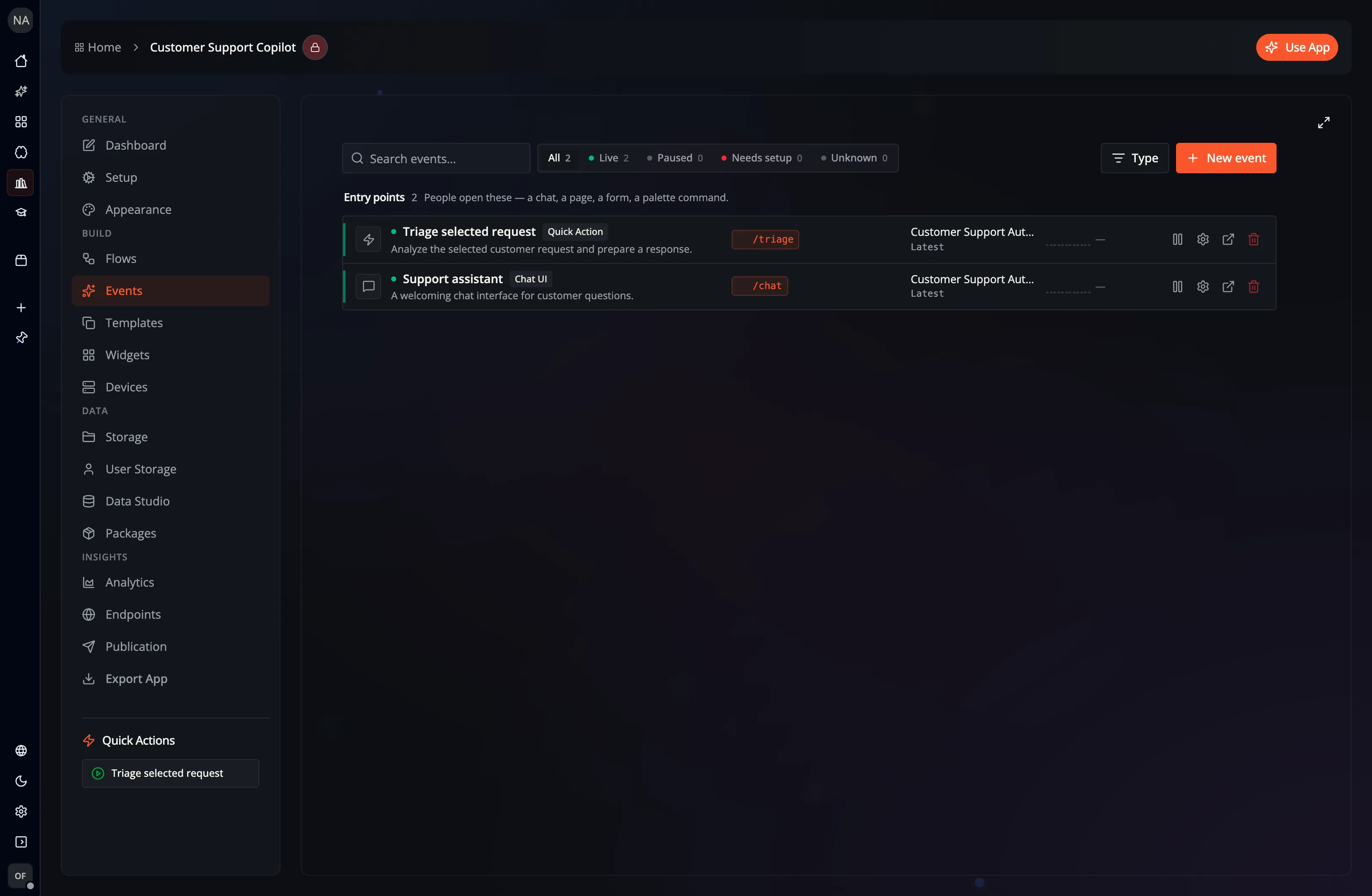
For a UI-capable Event:
- Open the app’s Events workspace.
- Create or select the Event.
- Edit its route badge inline, or open the Event configuration.
- Enter a unique Route Path.
- Save the Event.
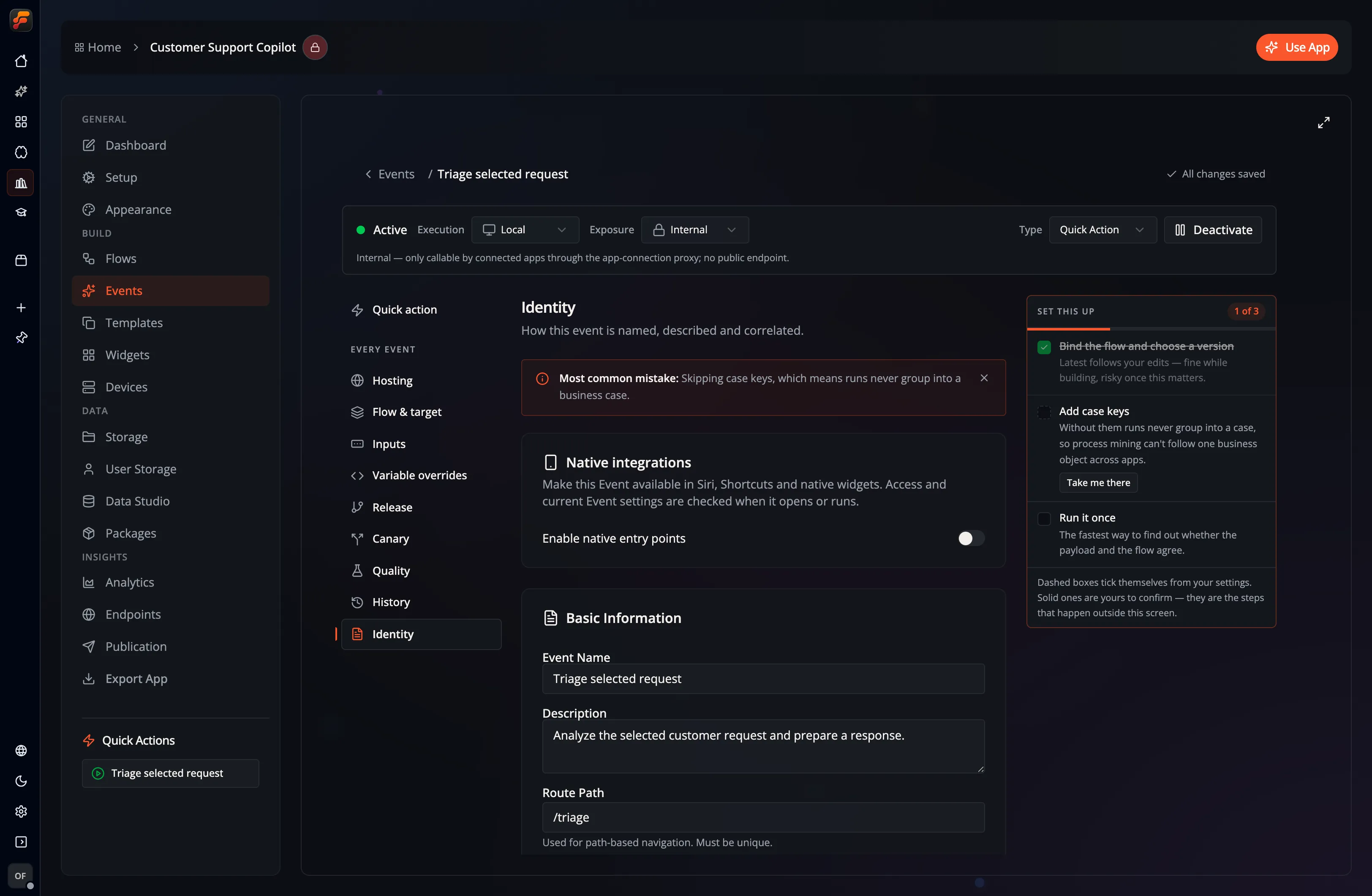
The UI normalizes a route path by:
- trimming whitespace;
- removing a query string before storing the path;
- adding a leading
/when it is missing; - using
/for an empty path.
The Events workspace rejects a path already owned by another Event. Deleting an Event also removes mappings that point to it, and the workspace cleans up mappings whose Event no longer exists.
Route-State API
Section titled “Route-State API”The current state interface is:
interface IAppRouteState {  getRoutes(appId: string, force?: boolean): Promise<IRouteMapping[]>;  getRouteByPath(    appId: string,    path: string,  ): Promise<IRouteMapping | null>;  getDefaultRoute(appId: string): Promise<IRouteMapping | null>;
  setRoute(    appId: string,    path: string,    eventId: string,  ): Promise<IRouteMapping>;  setRoutes(    appId: string,    routes: Record<string, string>,  ): Promise<IRouteMapping[]>;
  deleteRouteByPath(appId: string, path: string): Promise<void>;  deleteRouteByEvent(appId: string, eventId: string): Promise<void>;}
Read Routes
Section titled “Read Routes”const routes = await backend.routeState.getRoutes(appId);const reports = await backend.routeState.getRouteByPath(appId, "/reports");const home = await backend.routeState.getDefaultRoute(appId);getDefaultRoute is a lookup for the path /; there is no separate isDefault flag.
The browser-backed implementation sorts getRoutes results by path. Do not use that order as a navigation priority; the runtime resolves exact configured paths.
Set a Route
Section titled “Set a Route”const mapping = await backend.routeState.setRoute( appId, "/reports", reportsEventId,);setRoute is an upsert by path. If /reports already exists, the method changes its eventId; otherwise it creates the mapping.
To set several mappings:
await backend.routeState.setRoutes(appId, { "/": homeEventId, "/reports": reportsEventId, "/support": supportEventId,});setRoutes applies the provided entries. It does not delete mappings omitted from the object.
Delete Routes
Section titled “Delete Routes”Delete one path:
await backend.routeState.deleteRouteByPath(appId, "/reports");Delete every path owned by an Event:
await backend.routeState.deleteRouteByEvent(appId, eventId);The second form is useful when removing an Event because it prevents orphaned navigation entries.
Runtime Resolution
Section titled “Runtime Resolution”Web and Desktop read the current route from the path after /use, with the App ID
in the id query parameter:
/use/reports?id=<appId>Use /use/?id=<appId> to explicitly select the / route. A direct Event link
remains /use?id=<appId>&eventId=<eventId> when no route is specified.
Both clients also accept legacy links such as
/use?id=<appId>&route=/reports and replace the current browser history entry
with the path form. Shared URL builders can still supply the query form; each
client converts it when navigating. Desktop maps deep links to its bundled
use.html, and its development server rewrites them to the /use page.
Resolution follows this behavior:
- Load active Events and all route mappings for the app.
- Resolve the requested path exactly.
- If it has no mapping, fall back to the
/mapping. - Load the mapped Event.
- Render its Page or built-in interface when it has one.
A direct eventId selects an Event when no route is supplied. An explicit
route takes precedence; user-facing navigation should prefer stable route paths.
Query Parameters
Section titled “Query Parameters”Query parameters are navigation context, not route identity. For example:
/use/reports?id=<appId>&period=30d&team=salesThe stored mapping is still:
{ "path": "/reports", "eventId": "evt_reports"}A2UI navigation can include parameters in the route string or in the message’s queryParams object. Flow-Like carries them into the destination URL while resolving only /reports.
{ "type": "navigateTo", "route": "/reports", "replace": false, "queryParams": { "period": "30d", "team": "sales" }}Error and Conflict Handling
Section titled “Error and Conflict Handling”- Check for
nullwhen reading a route directly. - Configure
/so an unknown path has a useful fallback. - Verify that the mapped Event exists, is active, and exposes a usable interface before treating a path as user-facing.
- In custom tooling, check for an existing path before assigning it to a different Event if you want the same conflict behavior as the Events UI.
- Use
deleteRouteByEventas part of Event deletion.
Related Guides
Section titled “Related Guides”- Pages: connect a route Event to a Page
- Visual Builder: author route-aware Page actions
- A2UI overview: understand navigation messages