
API Integrations
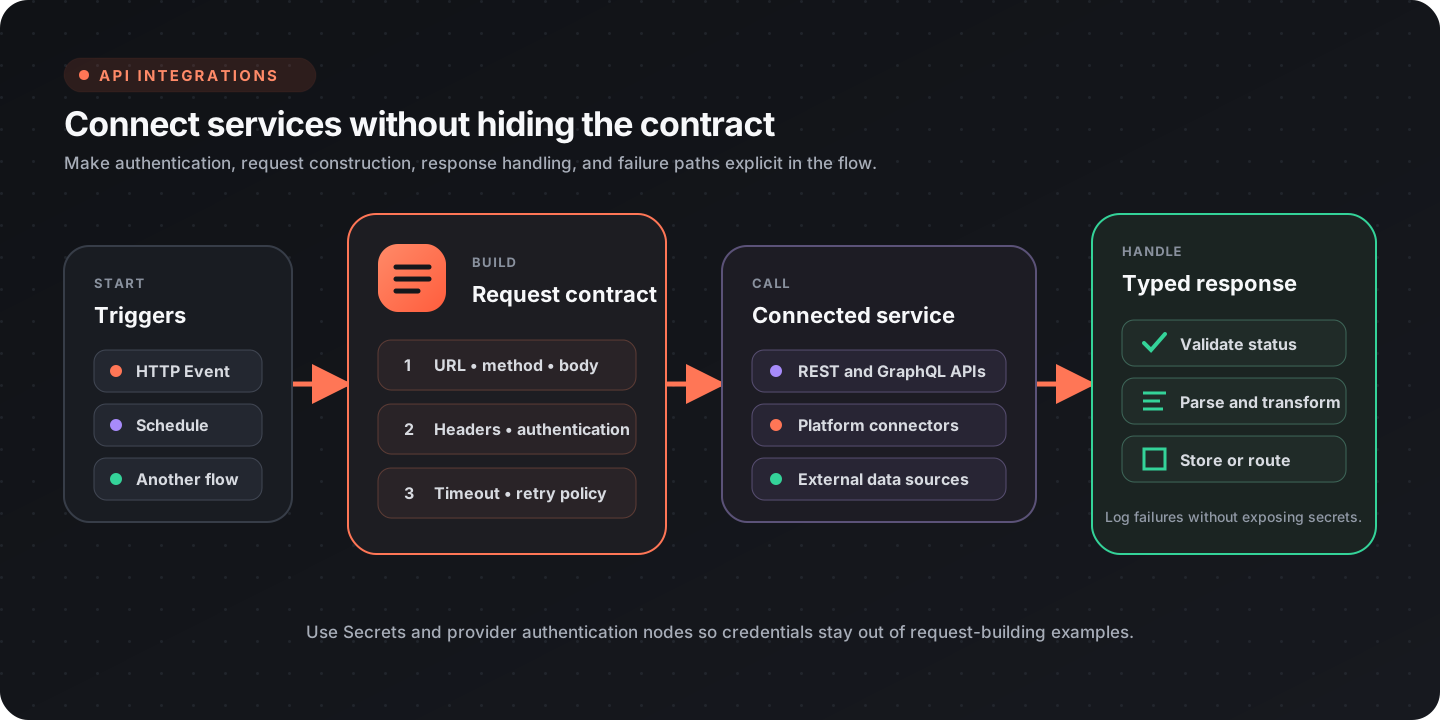
Flow-Like can call raw HTTP APIs, receive event-driven input, and use provider-specific nodes for common services. Keep authentication, request construction, response validation, and failure handling visible in the workflow.
Choose an integration path
Section titled “Choose an integration path”| Need | Recommended path |
|---|---|
| Call a REST or GraphQL endpoint | Build an HTTP request and run API Call |
| Reuse a supported service operation | Use the provider’s typed nodes |
| Receive an external event | Expose an app event or webhook entry point |
| Run a workflow from Microsoft Teams | Connect a Teams bot to a Chat Event |
| Stream a long response | Use Streaming API Call |
| Download a remote file | Use HTTP Download |
| Let an AI workflow call external tools | Connect an MCP server |
Provider coverage changes as packages evolve. Search the node catalog for the service and operation you need instead of relying on a fixed connector count.
Build and send HTTP requests
Section titled “Build and send HTTP requests”The HTTP nodes separate request construction from execution. That makes the URL, method, headers, authentication, body, and timeout policy inspectable before the network call runs.
| Stage | Useful nodes |
|---|---|
| Create | Make Request |
| Address | Set Url, Set Method |
| Headers | Set Header, Set Headers |
| Authentication | Set Bearer Auth |
| Body | Set Struct Body, Set String Body, Set Form Body |
| Execute | API Call or Streaming API Call |
A typical JSON request uses this sequence:
- Create the request.
- Set the URL and HTTP method.
- Add the content type and authentication.
- Attach a structured body.
- Execute the request.
- validate the status before parsing or storing the response.
For example, the structured body can be a regular JSON-compatible value:
{ "customer_id": 123, "items": [ { "sku": "FLOW-001", "quantity": 2 } ]}Authentication
Section titled “Authentication”Use the narrowest authentication mechanism supported by the service:
| Method | Guidance |
|---|---|
| Bearer token | Read the token from a Flow-Like secret and apply Set Bearer Auth |
| API key header | Read the key from a secret and apply Set Header |
| OAuth provider | Configure the provider connection and use its typed nodes |
| Basic or custom scheme | Construct the required header from secret-backed values |
Do not paste credentials into request examples, board constants, logs, or screenshots. Keep request-building examples focused on field names and retrieve the actual credential at runtime.
Validate and parse responses
Section titled “Validate and parse responses”Treat status validation and body parsing as separate steps. The response node family exposes:
| Check or conversion | Node |
|---|---|
| Status code | Get Status Code |
| Success range | Is Success |
| One header | Get Header |
| All headers | Get Headers |
| JSON body | To Struct |
| Text body | To Text |
| Binary body | To Bytes |
Route unsuccessful responses into an explicit error path. Include enough context to diagnose the request, but redact authorization headers and sensitive response fields before logging.
Reliability checklist
Section titled “Reliability checklist”- Set a timeout appropriate to the service.
- Retry only transient failures and rate limits; do not retry every
4xxresponse. - Make write operations idempotent when the API supports idempotency keys.
- Preserve the status and a safe response excerpt in the error path.
- Validate required fields after parsing JSON.
- Batch or paginate list operations instead of assuming one response contains every record.
Provider integrations
Section titled “Provider integrations”The catalog includes typed nodes for services such as GitHub, Microsoft 365, Google Workspace, Notion, Atlassian, and Databricks. Exact operations differ by provider and package version.
| Provider family | Typical operations |
|---|---|
| GitHub | Git repositories, issues, pull requests, files, actions, releases |
| Microsoft 365 | OneDrive, SharePoint, Outlook, Planner, To Do |
| Google Workspace | Drive, Gmail, Sheets, Slides, Meet, Calendar |
| Notion | databases, pages, search, files |
| Atlassian | Jira issues and attachments, Confluence pages and content |
| Data platforms | jobs, SQL execution, storage, and catalog operations |
| Collaboration | Teams, email, calendars, files, and notifications |
Use a provider node when its typed inputs match the operation. Use the raw HTTP path when you need an endpoint or option that the package does not expose.
Work with an existing Git checkout
Section titled “Work with an existing Git checkout”Use Sync Repository when a recurring workflow needs the latest files. It clones a missing repository and updates an existing checkout. Clone Repository remains useful when the workflow requires a fresh clone; it fails when the destination already contains files.
Git nodes accept a FlowPath in a local, cloud, or memory store. FlowPath identifies a location within a configured store. The runtime needs Git installed. Cloud and memory operations also need temporary disk space on the runtime: each operation restores the checkout and Git metadata, runs Git, then saves changes back to the store.
Connect the Repository Path output from Clone or Sync to subsequent Git nodes. Those nodes expect the repository root. Clone appends the repository name to its Target Directory; Sync uses its Repository path as the exact checkout directory.
New Clone nodes enable Include .git by default. Disable it only when you need
a file-only snapshot. Existing cloud or memory snapshots without .git need a
fresh clone into an empty destination with Include .git enabled before Git
nodes can use them.
Cloud and memory operations acquire .git/flow-like-store.lock in the repository
store to prevent overlapping Git operations. Schedule direct file edits between
Git nodes; file-writing nodes do not honor this lock. If a stopped runtime leaves
a lock behind, confirm the prior operation has stopped before removing it.
Saving uses multiple object writes, so other readers can observe an incomplete checkout until the save finishes. If an upload fails after saving starts, the node retains the lock and temporary checkout and reports its location. Use that checkout to recover changes before clearing the lock and retrying.
Clone, Fetch, Pull, Push, and Sync authenticate over HTTPS with the GitHub Provider. Use remote URLs on the provider’s host; Git URL rewrites are not supported. Credentials are supplied for each operation and kept out of newly cloned repositories’ remote URLs.
The GitHub catalog includes both Git working tree operations and GitHub API operations. Switch Branch changes the local checkout. Create Branch and Delete Branch call GitHub’s API; use Create Local Branch and Delete Local Branch to change branches in the checkout.
| Goal | Git nodes |
|---|---|
| Create or update a checkout | Init Repository, Clone Repository, Sync Repository, Fetch Repository, Pull Repository |
| Inspect files and history | Repository Status, Repository Diff, Repository Log, List Local Branches |
| Change the checked-out version | Switch Branch, Checkout Revision, Create Local Branch, Delete Local Branch |
| Record and publish changes | Stage Files, Unstage Files, Commit Changes, Push Repository |
| Set work aside | Stash Changes, List Stashes, Pop Stash |
| Combine or undo changes | Merge Branch, Abort Merge, Reset Repository |
| Configure remotes | List Remotes, Add Repository Remote, Set Repository Remote URL, Remove Repository Remote |
| Mark versions | List Local Tags, Create Local Tag, Delete Local Tag |
Refresh a repository on each run
Section titled “Refresh a repository on each run”- Select a directory in a local, cloud, or memory store and configure the GitHub provider for the repository.
- Run Sync Repository with the owner, repository, and optional branch. Use the same destination on later runs.
- Connect Success to the processing steps and pass Repository Path to file-reading or Git nodes.
- Route Error separately and inspect Error Message before retrying.
Sync checks that an existing checkout’s origin matches the requested
repository. Updates use fast-forward behavior: the branch can advance only
when its existing commits are already in the remote history. A divergent
branch needs an explicit reconciliation step. Sync does not silently discard
local work or replace a checkout belonging to another repository.
For a checkout you already have, use Fetch Repository to download remote
history without changing checked-out files. Inspect Repository Log with a
remote revision such as origin/main to see the downloaded commits. Pull
Repository updates the current branch using fast-forward-only behavior.
Commit and push workflow changes
Section titled “Commit and push workflow changes”Inspect Repository Status, write the intended files, then use Stage Files with explicit repository-relative Paths, or enable All to stage all tracked changes and new nonignored files. Paths are literal; wildcards are not expanded. Review Repository Diff with Staged enabled before running Commit Changes. Supply Author Name and Author Email, or use an identity already configured in the repository. Unstage Files removes changes from the next commit while retaining the edited files. Finish with Push Repository, then use GitHub’s Create Pull Request node if the workflow needs a review.
Switch Branch expects an existing local branch and requires a clean checkout
by default. To start from a remote branch, use Create Local Branch with a
Start Point such as origin/feature, then switch to the new local branch. Use
Stash Changes to set unfinished tracked changes aside and Pop Stash to
restore them. Enable Include Untracked when new files should be stashed too.
Merge Branch defaults to fast-forward-only behavior. Disable Fast Forward
Only when the workflow should allow a merge commit. If a merge reports
conflicts, inspect the checkout and resolve them before committing, or run
Abort Merge. Reset Repository defaults to mixed, which keeps edited
files. Its hard mode can discard edits and requires Allow Destructive to
be enabled explicitly. Keep that choice separate from a routine refresh.
Incoming events and webhooks
Section titled “Incoming events and webhooks”For an incoming webhook, design the board around a small, auditable boundary:
- Accept the request through the appropriate app event.
- Verify the provider signature before trusting the body.
- Parse and validate the event schema.
- Branch on the event type.
- Make repeated delivery safe with the provider’s event or idempotency identifier.
- Return promptly and move long-running work to an asynchronous path where appropriate.
See App events for the app-side event model.
Files, email, and MCP
Section titled “Files, email, and MCP”- HTTP Download writes a remote file through the workflow’s file abstraction.
- Send Mail sends email over an SMTP connection.
- MCP Local Server starts a configured local MCP process.
- MCP HTTP Server connects to an MCP endpoint over HTTP.
MCP tools can expand what an AI workflow is able to call. Review the server’s tools, credentials, and data access as carefully as any other external integration.
Design checklist
Section titled “Design checklist”- Authentication comes from secrets or a provider connection
- Request timeout and retry behavior are explicit
- Non-success responses have a dedicated path
- Parsed responses are validated before downstream use
- Logs redact tokens and sensitive payload fields
- Pagination, batching, and rate limits are considered
- Webhook signatures and replay behavior are handled
- Provider-specific nodes are preferred when they improve type safety