
A2UI runtime and messages
Use this guide when integrating Flow-Like’s A2UI renderer or producing surface messages from a workflow. For authoring tasks and the shared Page, Widget, and route definitions, start with Build interfaces with A2UI.
An A2UI surface is data, not executable frontend code. It contains allowlisted component types, a data model, styling, and actions. The Flow-Like renderer turns that description into native React components.
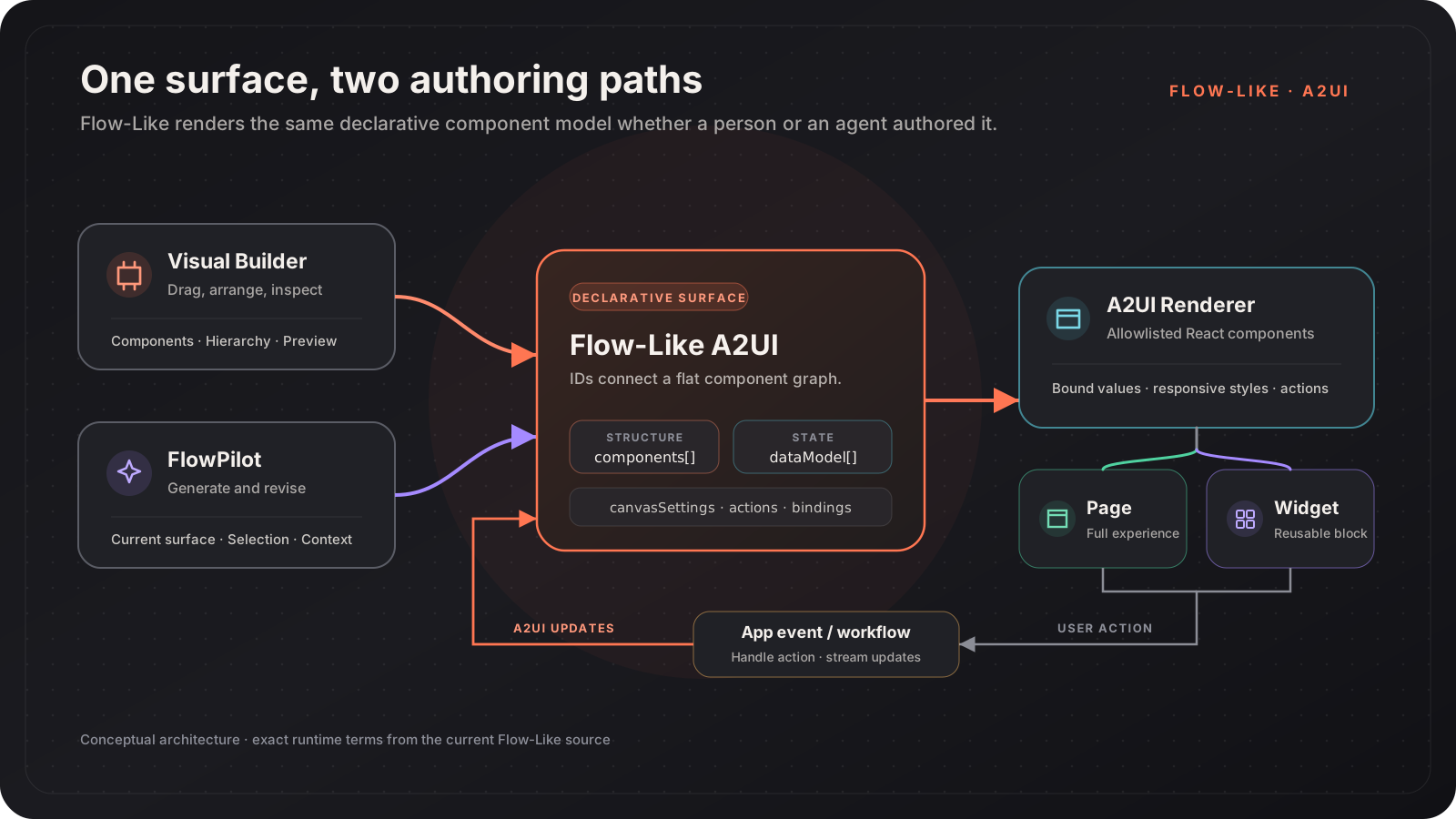
Two Ways to Author One Surface
Section titled “Two Ways to Author One Surface”| Authoring path | Best for | What it changes |
|---|---|---|
| Visual Builder | Precise composition and inspection | The surface’s components, styles, actions, and canvas settings |
| FlowPilot | Generating a first draft or revising a selected area | The same surface model used by the builder |
| Combined | Fast iteration with human review | FlowPilot proposes changes; you inspect, apply, and refine them |
Because both paths work on the same model, a generated surface can be opened in the builder and a manually authored surface can be given back to FlowPilot as context.
Runtime Model
Section titled “Runtime Model”A surface has a stable ID, a root component, a flat component graph, and optional data and canvas settings. Parent components refer to their children by ID.
This is a minimal rendering message in the current Flow-Like format:
{ "type": "beginRendering", "surfaceId": "sales-dashboard", "rootComponentId": "root", "components": [ { "id": "root", "component": { "type": "column", "gap": { "literalString": "16px" }, "children": { "explicitList": ["title"] } } }, { "id": "title", "component": { "type": "text", "content": { "literalString": "Revenue" }, "variant": { "literalString": "heading" } } } ], "dataModel": []}The flat graph matters for both humans and agents:
- A component can be updated by ID without replacing the whole surface.
- Components can arrive incrementally while a workflow is running.
- The hierarchy remains explicit and inspectable.
- Values can be literal or resolved from a data-model path.
Surface Messages
Section titled “Surface Messages”The renderer handles a broader set of messages, but these are the core surface operations:
| Message | Purpose |
|---|---|
beginRendering | Create a surface with its root, components, and initial data |
surfaceUpdate | Add or replace components on an existing surface |
dataModelUpdate | Add or replace data entries |
setCanvasSettings | Update the surface background, padding, or custom CSS |
createElement / removeElement | Change the component graph incrementally |
deleteSurface | Remove a surface |
Navigation, dialogs, global/page state, and query-parameter updates are represented as explicit messages too. They are handled by the host rather than executed as arbitrary code.
Component Catalog
Section titled “Component Catalog”Flow-Like only renders registered component types. The current catalog includes:
| Category | Examples |
|---|---|
| Layout | Row, Column, Stack, Grid, Scroll Area, Box, Center, Spacer |
| Display | Text, Image, Markdown, Table, charts, Calendar, Gantt, Geo Map |
| Interactive | Button, Text Field, Select, Checkbox, File Input, Voice Input, Link |
| Container | Card, Modal, Tabs, Accordion, Drawer, Tooltip, Popover |
| Specialized | File Preview, Diff View, image annotation, 2D and 3D scene components |
The palette in the Visual Builder is the practical reference for the components currently available to authors. The renderer registry is the source of truth for what a client can display.
Pages and Widgets
Section titled “Pages and Widgets”Pages and Widgets both store A2UI components, but they have different lifecycles.
| Concept | Scope | Runtime role |
|---|---|---|
| Page | A full interface owned by a Flow | Rendered when an app event targets the page |
| Widget | A reusable UI block | Inserted into a Page or another surface as a widget instance |
A Page can also define load, unload, and interval events. A Widget can define named actions that a host instance maps to workflow bindings.
Actions and Workflow Updates
Section titled “Actions and Workflow Updates”The current action handler recognizes exact built-in action names:
| Action | Required context | Behavior |
|---|---|---|
workflow_event | nodeId; the builder also stores appId and boardId | Executes the selected workflow Event |
widget_event | actionId | Resolves that Widget action through the instance’s workflow binding |
navigate_page | route; optional queryParams | Navigates within the app |
external_link | url | Opens an external URL in a new tab |
workflow_event is not an arbitrary event label: context.nodeId identifies
the Event node. Likewise, a Widget component always uses the literal
widget_event name and selects its declared Widget action through
context.actionId.
Unknown action names may be forwarded as a structured userAction message to
an optional host callback, including the name, surface/source component IDs,
timestamp, and context. That fallback does not execute a workflow by itself.
For workflow actions, the handler invokes the board with element values, input values, action context, and navigation state. During the run, Flow-Like can stream A2UI updates, state changes, navigation, progress, and logs back to the client.
This keeps the boundary explicit:
- A component declares one of the supported action contracts.
- The handler validates its required routing context.
- Flow-Like resolves the Event or Widget binding and runs it.
- The workflow returns declarative updates.
Continue
Section titled “Continue”- Page runtime and state API: integrate Page lifecycle and storage
- Widget runtime and bindings: configure reuse, overrides, and actions
- Visual Builder controls: look up editor behavior
- Route-state API and resolution: map paths to App Events