
Events
Enable Developer Mode to see this workspace in the App navigation.
With Events, you can connect your Flows to App interfaces and external systems. Create Pages in their owning Flow’s Explorer, then use an Event to expose each interface. See Create Pages.
Creating a workflow-backed Event requires at least one existing Flow in your app that includes an event node. You can create and manage them in your app’s Flows section.
Most workflow-backed Events target a specific event node within a particular Flow. You can create multiple Events that reference the same event node and differentiate them by their payloads and configurations. Page-target Events can instead open a visual page directly.
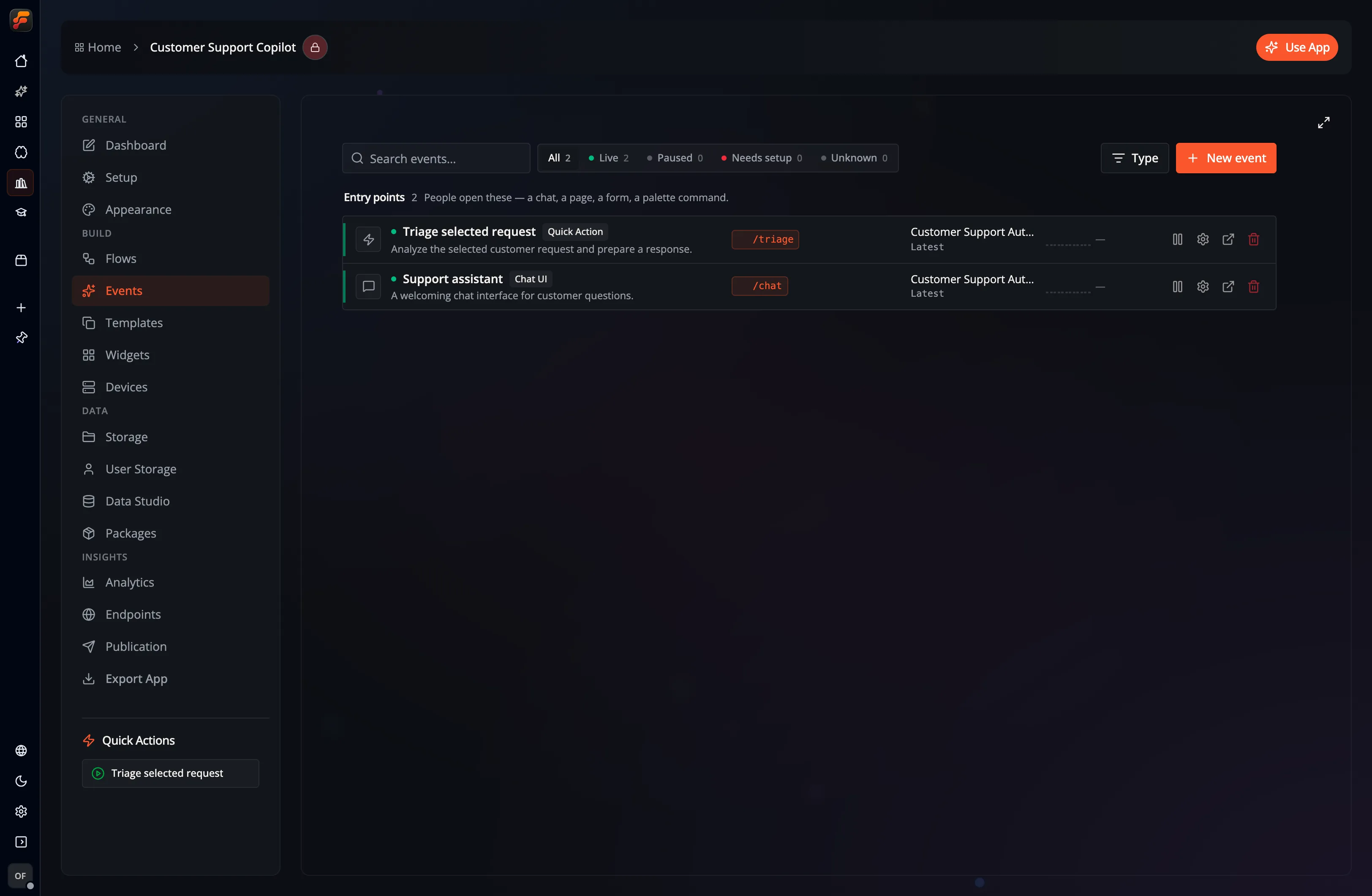
Event Types
Section titled “Event Types”The list groups Events into Entry points, which people open as an App interface, and Triggers, which receive requests, schedules, messages, or other background input. UI-capable Events can have a route path.
Which Event types are available depends on the event node in the selected Flow:
| Flow event node | Available Event types |
|---|---|
| Chat Event | Chat UI, Discord, Telegram, Teams Bot |
| Inbound Email Event | Inbound Email |
| Mail Event | |
| Location Event | Location Region |
| Generic Event | Generic Form, API, Deeplink |
| Simple Event | Quick Action, API, Cron, Daemon, Deeplink, REST, MCP |
The built-in UI types are Chat UI, Generic Form, and Quick Action. A Page-target Event is also listed under Entry points because it opens a visual page directly.
Quick Action
Section titled “Quick Action”A Quick Action adds a manually invoked action to the App. Its form can collect exposed Flow variables before triggering the selected event node.
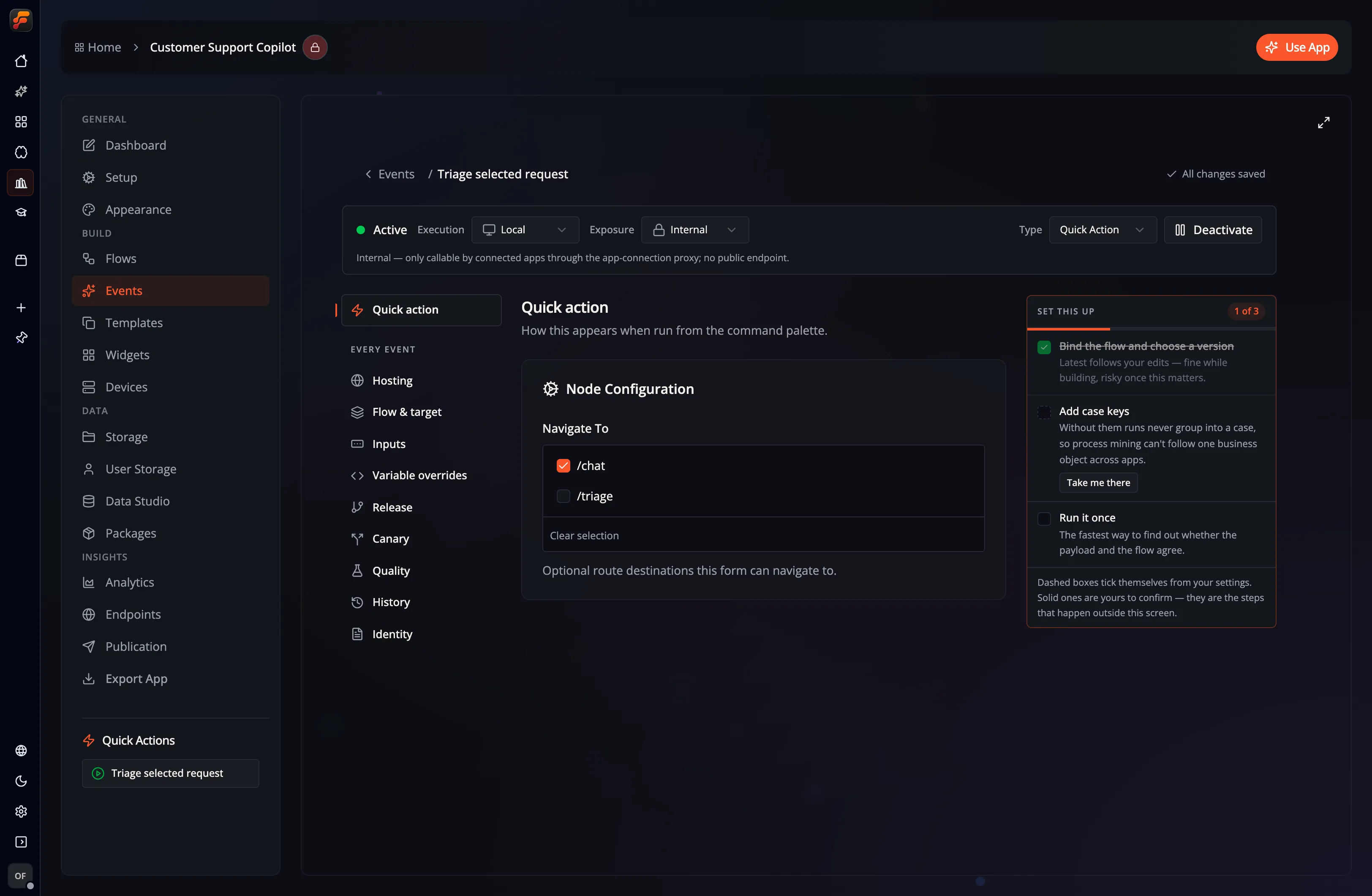
Chat UI
Section titled “Chat UI”A Chat UI Event invokes a Flow through the built-in chat interface. It passes the chat context, such as message history, to the event node and can also accept file attachments, tools, and default prompts.
Generic Form
Section titled “Generic Form”A Generic Form creates a route-backed form from the Flow’s exposed variables. Submitting the form invokes the selected Generic Event node.
External and background Events
Section titled “External and background Events”- API exposes one configured HTTP endpoint.
- REST exposes a multi-endpoint REST surface with authentication.
- MCP exposes a Model Context Protocol server.
- Cron invokes a Flow on a schedule.
- Daemon supervises a long-running local Flow and can restart it after a failure.
- Location Region invokes a Flow when this device enters or leaves a configured circular region.
- Deeplink invokes a Flow through a Desktop deep link.
- Discord, Telegram, and Email connect their respective services to the compatible event node. Email here reads a mailbox through IMAP.
- Teams Bot connects a Chat Event to Microsoft Teams.
- Inbound Email receives messages at a generated server address. Use an Inbound Email Event node and a server with mail ingress configured.
Local and Remote availability
Section titled “Local and Remote availability”Event types are constrained by where their sink can run:
| Event type | Availability |
|---|---|
| API, Cron | Local or Remote |
| Daemon, Deeplink, Discord, Telegram, Email | Local |
| REST, MCP, Teams Bot, Inbound Email | Remote |
| Location Region | iOS or macOS sensor; Local or Remote workflow |
| Quick Action, Chat UI, Generic Form, Page target | App interface; Remote for hosted frontends |
Choose Local or Remote in the Event editor where both are supported. REST and MCP Events can additionally be Public or Internal. An Internal endpoint is callable by connected Apps through the App-connection proxy and does not expose a public endpoint.
Publish a hosted chat, form or page
Section titled “Publish a hosted chat, form or page”An App’s chats, forms and pages can open from one link in the existing Flow-Like
web application, including its static export: /a/<app-id>/<route>. The route
selects the interface, the same way it does inside the App, so /a/<app-id>/
opens the App’s default route and /a/<app-id>/orders opens the Event whose
route is /orders. Workflow execution runs on the Flow-Like server.
Each route is published separately. Hosting starts disabled, and turning it on requires visitors to sign in by default.
- Give the Event a Route Path under Identity. Chat UI, Generic Form,
Quick Action and Page-target Events have one; the App’s default Event
answers
/. - Select Hosting and turn on Enable static hosting.
- To accept anonymous visitors, separately turn on Allow anonymous access and confirm the warning: anyone with the link can execute workflows, and the App owner pays for their usage. Leave this off to require sign-in.
- Set execution to Remote, exposure to Public, and activate the Event. The Hosting section lists each requirement that is still missing, with a button to fix it. If the Flow fixes the execution location, change it in the Flow first.
- Save the Event, then copy Link to this route.
The editor includes the API host in the link. With separate API and web hosts, the API redirects visitors to the same path on the existing web application. With a shared host, the path opens directly in the web application.
Navigation between pages keeps visitors on the same App link and changes only the route. A navigation target works when its Event is published too and uses the same sign-in setting as the current page; otherwise visitors see that the page has not been published on this link.
When sign-in is required, a visitor follows the installation’s Flow-Like login flow and returns to the same frontend. The workflow receives the authenticated user’s identity. Public exposure allows the hosted route to exist; Allow anonymous access separately controls anonymous use. Disabling hosting, removing the route, deactivating the Event or changing it to Local or Internal removes hosted access for that route. Disabling hosting also clears the anonymous choice in the editor, so enabling it again starts with sign-in required. Save the Event to apply these changes.
Self-hosted installations use their existing web deployment and login callback. See Host chat, form and page frontends for static route and API redirect configuration.
Quick actions and forms on a device
Section titled “Quick actions and forms on a device”A Quick Action or Generic Form Event without a default Page can be deployed to a device as part of a service. People start it there from Devices with Run now…; nothing on the device runs it by itself. Deploying it moves nothing away from the App: the App, the desktop app and every device it is deployed to can offer it at the same time, and Whole app in the deploy wizard includes it. An Event with a default Page is deployed as that Page.
- Who may run it. Everyone who may start the service may run its quick actions and forms, with inputs of their choice. App roles are not checked on the device. For an online App the run acts as the person who approved the service’s cloud access, not as the person who pressed Run; for an offline App, as the device’s local user.
- The form comes from the device. Its fields are the outputs of the Event’s node in the Flow version the service runs, so a service that is not running shows no form. After the service is updated, an open form must be reloaded before it can run. File fields cannot be filled from Devices.
- Limits. The inputs of one run are at most 64 fields and 12 KiB. A service runs four of these runs at once and keeps eight more waiting; beyond that it answers that it is busy. A run that no instance of the service picks up within 30 seconds does not start. A run is stopped at the service’s request time limit, or after one hour when the service has no web endpoint. Stop this run cancels it.
- The result. The device returns the Flow’s result only to the person who started the run, shortened beyond 8 KiB, and keeps it for at most 24 hours and only until the device agent restarts. A failed run reports a fixed reason; the service’s log has the details. A Flow that asks a question is stopped, because nobody can answer it on a device.
- What is recorded. The device’s operation journal records who ran which Event and when, never the inputs or the result. The run itself records its input in the service’s run history on the device, as every run does, including fields marked sensitive.
- Spending. Hosted models a run uses count against the service’s spending limit.
A service that holds only quick actions and forms has no web endpoint and runs one instance.
When the service also serves a Page, a chat or an Endpoint, its quick actions
and forms are on the service’s page as well, where file fields can be filled.
That page runs them with POST /run/{event id} on the service’s address, so
everyone who holds the service’s access token can run them. These runs are not
in the operation journal; they count in the service’s runs and its usage like
every other request.
Location Regions
Section titled “Location Regions”Add a Location Event node to a Flow, then create a Location Region Event from it. Choose a Geometry Point center in longitude-latitude order, a radius in meters, and entering, leaving, or both transitions. Save and activate the Event to register the region on this device. For a Remote Event, this device sends the configured center, radius, and transition to the server workflow.
While the app is open stops monitoring when Flow-Like leaves the foreground. Also in the background opts into native region monitoring. Use the explicit permission buttons in the Event editor to grant location access. Reading the permission status, editing a region, or activating an Event never opens a permission prompt. iOS background monitoring requires Always authorization; the operating system may ask for this in stages.
The editor shows authorization, monitoring errors, and the device’s region count. Up to 20 regions can be monitored at once. On macOS, Flow-Like must stay running and the computer must be awake. On iOS, the system schedules crossing delivery, so callbacks can be delayed or unavailable after force-quitting the app. Region monitoring does not record a continuous path.
The node’s Region center Geometry output is the monitored center. It is not a measurement of the device’s position. Use Get Current Location separately while the app is open when the workflow needs a fresh fix and its accuracy.
Pending crossings use an at-least-once queue, capped at 128 transitions and one hour. A retry can deliver the same crossing again. Use Transition ID to deduplicate workflow side effects. Disabling the Event or changing account invalidates its pending crossings.
Select the Flow implementation
Section titled “Select the Flow implementation”An Event targets an event node in a Flow and can use:
- Latest, which follows the editable Flow draft; or
- a numbered, immutable Flow version.
Pin externally consumed or production-facing Events when draft changes should not alter live behavior. See Versioning and Release and roll back an Event for Quality, Canary, and Event History.
Configure and test
Section titled “Configure and test”- Create the compatible event node in Studio.
- In Events, create an Event and select the Flow, Flow version, and node.
- Choose an Event type and execution location supported by that node.
- Configure its route, schedule, service credentials, or interface options.
- Activate the Event and test the complete invocation path.
For online and server-side behavior, see Offline vs. Online.
Siri, Shortcuts, and native widgets
Section titled “Siri, Shortcuts, and native widgets”Use Siri, Shortcuts, and Handoff to launch an Event, return its result to another Shortcut action, or open a chosen App path. Use Native widgets for system launchers, charts, and cached App Pages on iOS and macOS.